This article is not very technical. Just a little update on my personal news.
I decided to start my own software company - DevAtlant.
I will propose to my existing and new clients my experience in software development - Java, Web, distributed architectures, video streaming and much more.
DevAtlant will be also the first company in Ukraine to promote the #FrenchTech label across local Ukrainian communities - students, developers, entrepreneurs.
jeudi 19 mai 2016

jeudi 11 juin 2015
Automatic Selenium screenshot with TestNg, Maven and Jenkins CI
Recently I was working on the automatisation of Selenium tests.
We have built a pretty classical stack for running test:
We have built a pretty classical stack for running test:
- Jenkins master - main entry point and orchestrator of the build
- Jenkins swarm client on a Windows 8 PC with IE 11 - where the builds are executed
- Maven Surfire Plugin
- TestNg
- Selenium
One of the problem I encountered was not very user-friendly alert about failed tests. Jenkins send an email with a link to the unstable build. No details about failed tests, no exceptions, just a link. So I need to open my laptop, turn on my VPN, go to Jenkins server and see the details.
Too many steps.
It would be great to get a detailed alert. It's not a problem with Jenkins' Editable Email Notification and special token ${FAILED_TESTS}. This token will bring in your email detailed information about failed test. I love stacktraces, but for normal people it's a mess and frankly speaking it takes some time to understand what's going on even for a geek.
So my idea was to send a screenshot of every failed test within Jenkins alert notification. So this way, it takes a second to see the broken page and understand the root cause.
For this we will need to use the following tricks:
- org.testng.TestListenerAdapter.onTestFailure is triggered when a test is failed.
- org.openqa.selenium.TakesScreenshot takes a screenshot
- copy the screenshot to maven target folder for further usage
- use Jenkins Editable Email Notification/Attachments feature
First 3 steps are already implemented in this maven project - https://github.com/yev/seleniumMvnScreenshot
To use it you need to add the following dependency in your pom.xml file which holds the selenium tests.
To use it you need to add the following dependency in your pom.xml file which holds the selenium tests.
      com.github.yev
      screenshot
      1.0
The 4 step is only about jenkins config:
 |
| Go to your Jenkins job configuration |
 |
| Modify the regexp path to match your maven project holding the selenium test |
Post your comments here or in my twitter if you have some questions or idea to improve this stuff.
mercredi 3 juin 2015
Automatic environment setup for Mac OS X developers
This post covers the subject of how to setup the automatic project infrastructure startup for users working on Mac OS X.
1. iTerm2
2. zsh + ohMyZsh
3. iTerm Profiles
4. iTerm Window saving mechanism
 4. How do you manage the error messages which occur in different terminals/tabs? Well, in my case, I should go tab by tab and look into the logs... Annoying, no? It would be better, if I could be notified automatically by Growl or something like that with error message and service name which produced the error. There is a nice hack for this. We will use a feature of iTerm Profile which is called Triggers (select Profile -> Advanced -> Triggers -> Edit). Then you should specify 3 parameters:
Now each time you need to start working on this project, you simple go to Window -> Restore Window Arrangement and voila all the project env is up and you are ready to work in less the 2 seconds.
For those lucky developers, who are using multiple computers, like iMac at the office and MacBook at home, you can reuse the iTerm config with all setups iTerm -> Preferences -> General -> Preferences -> Load preferences from a custom folder or URL. You specify your Dropbox/Google disk folder and you can restore it from another computer.
Introduction
This article will be useful for those who are working on the projects combining multiple technologies. In my case the project includes Xmpp server, Rtmp server, ElasticSearch, MySQL, Ruby on Rails application, Memcached. All of this technologies are running in a separate terminal (terminal tab). So when I start my working day I should always repeat the same actions by running each of those services. To be more productive and don't spend my time by re-typing many times the same commands, I automated the creation of development environment.Concept
The key tool for such automatisation is iTerm.app
One powerful features of iTerm is profile. In our case, one profile - one server/service.
My solution consists of the following parts:1. iTerm2
2. zsh + ohMyZsh
3. iTerm Profiles
4. iTerm Window saving mechanism
Implementation
1. Open iTerm.
2. For each technology (server) we will create a specific profile:
 |
| In this screenshot I've created a profile for Rails server. Before server start I want to show the state of my git repo. |
3. Then, for newly created profile we will define some useful hot keys for server restart or trigger the rebuild, followed by restart, etc:

- regexp expression which identify the error entry for a particular service. For example, for my java based XMPP server, this regexp is simple 'ERROR'.
- Action to be taken when regexp is occurred in the tab. You have many options there. Play sound, run a cmd, show growl notification, bounce dock icon, etc.
- finally the optional parameter for the action you choose in the previous step. For example, for Growl notification it will be a text to be showed.
Now each time you need to start working on this project, you simple go to Window -> Restore Window Arrangement and voila all the project env is up and you are ready to work in less the 2 seconds.
For those lucky developers, who are using multiple computers, like iMac at the office and MacBook at home, you can reuse the iTerm config with all setups iTerm -> Preferences -> General -> Preferences -> Load preferences from a custom folder or URL. You specify your Dropbox/Google disk folder and you can restore it from another computer.
vendredi 15 août 2014
Nginx and Memcached - connections timeout under high load
Just a little post to summurize my experience after resolving a performance issue between nginx and memcached.
After successfully connect Nginx to fetch some binary data from Memcached, we experienced a problem in production under moderate load (10K of users online). The logs of nginx were plainly of the following error messages:

In the same time the CPU load was extremely high - about 100% for each core. On the top of the most busy processes were the Nginx workers.
So Nginx was unable to open new connections to memcached.
Before I found the reason and the fix for this problem I had the following nginx configuration.


After successfully connect Nginx to fetch some binary data from Memcached, we experienced a problem in production under moderate load (10K of users online). The logs of nginx were plainly of the following error messages:
In the same time the CPU load was extremely high - about 100% for each core. On the top of the most busy processes were the Nginx workers.
So Nginx was unable to open new connections to memcached.
Before I found the reason and the fix for this problem I had the following nginx configuration.
The keyword to solve this problem is - persistent connection. I figured out that Nginx tried to open a new TCP connection for every new request. It's a huge waste, as opening a new TCP connection can take a lot of time and ressources.
So to fix the problem I declared an upstream with one single memcached server and set the directive keepalive to 1024:
More information about this parameter you can found in the official Nginx documentation: here
After reloading nginx config, the connection timeout errors gone. And the CPU load was quite small and generated in this case only by memcached.
So now our production memcached instance serves up to 6500 images per second. Quite impressive and reliable (upstart is more then 3 months and I'm sure that it will continue to rock )
jeudi 14 août 2014
MacBook Pro WiFi hardware config problems
Recently, I have experienced the problem with my Mac Book Pro mid 2009.
The WiFi module couldn't detect any WiFi network.
I have tried all naive solutions, like recreating WiFi config, restart the computer. Nothing helps.
Fortunately, I have found this article - http://www.cnet.com/news/tackling-the-no-wi-fi-hardware-installed-error-in-os-x/
And the second solution - reset the PRAM - helped me. After reseting the hardware configuration, my Mac saw all WiFi networks.
I hope this little note will be useful for somebody.
The WiFi module couldn't detect any WiFi network.
I have tried all naive solutions, like recreating WiFi config, restart the computer. Nothing helps.
Fortunately, I have found this article - http://www.cnet.com/news/tackling-the-no-wi-fi-hardware-installed-error-in-os-x/
And the second solution - reset the PRAM - helped me. After reseting the hardware configuration, my Mac saw all WiFi networks.
I hope this little note will be useful for somebody.
mercredi 23 avril 2014
java-ffmpeg-pipe-memcache
Just a cross link https://github.com/yev/java-ffmpeg-pipe for github repo with simple code example which demonstrates how to push snapshot grabbed by ffmpeg from a video stream to a memchache server without intermediate File System calls.
The schema describing the interactions between all components:
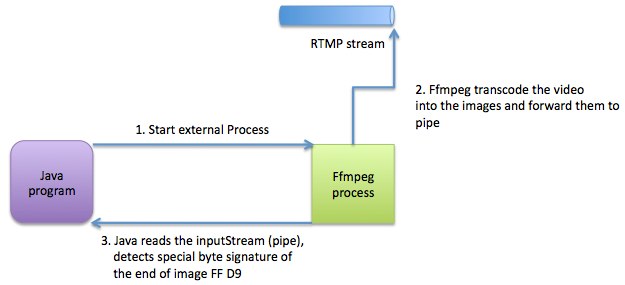
The schema describing the interactions between all components:
Actually, the RTMP stream can be replaced with a whatever source which can be read by ffmpeg.
samedi 22 février 2014
Best java client for swift (OpenStack storage) - JOSS
Recently, I had a task to choose a java client for interacting with OpenStack Storage service aka Swift.
I recommend you JOSS
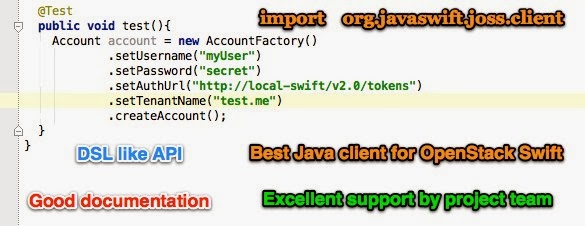
Actually, I found 3 open source projects on GitHub:
- https://github.com/dkocher/java-openstack-swift
- https://github.com/woorea/openstack-java-sdk
- https://github.com/javaswift/joss
After testing and working for a bit with each library I ended up with the following conclusion - the best one is JOSS - http://joss.javaswift.org
So, now the list of advantages:
- openstack-java-sdk is a huge library for almost all OpenStack services. I needed only swift driver so I wasn't interested to add useless dependencies. Always use KISS principle.
- java-openstack-swift from dkocher - I didn't manage to make a connection to my swift proxy. Maybe this library is very good and written by smart people, but the documentation is poor. If a developer should dig into the code source to figure out how to make the basic simple step, this will increase the learning curve. One more little disadventage is absence of the project in maven central repo.
- And finally the winner - JOSS - https://github.com/javaswift/joss by Robert Bor.
Why JOSS:
- Very simple API.
- The principle of modern fluid API building is used. The API is readable and comprehensible.
- Good documentation for each common task (authentication, uploading, downloading, etc)
- Available at standard maven repo.
- Excellent support organised by the project author - Robert Bor. He helped me within few hours to find an error in my configuration and pleased me with his reaction and quality of responses.
vendredi 25 janvier 2013
BuildNumber Component for Yii framework
Today I have committed the build number component for Yii framework.
This component is very simple but yet powerful and useful for industrial and enterprise-wide applications.

The project is hosted on GitHub - https://github.com/yev/yiiGitBuildNumber
This component is very simple but yet powerful and useful for industrial and enterprise-wide applications.
The project is hosted on GitHub - https://github.com/yev/yiiGitBuildNumber
lundi 14 janvier 2013
Java 7 list of new features
I've just put the link here to find it quickly:
http://docs.oracle.com/javase/7/docs/webnotes/adoptionGuide/index.html
This is an adoption guide for java 7 with the list of all new features (from official Oracle site).
http://docs.oracle.com/javase/7/docs/webnotes/adoptionGuide/index.html
This is an adoption guide for java 7 with the list of all new features (from official Oracle site).
vendredi 11 janvier 2013
Crypt password with salt in Yii framework
Hello,
Today I will share my experience while learning PHP and Yii framework by using the standard PHP function crypt.
First of all, here you can find some basic theory about why do you need use salt to encrypt the passwords.
Let's discuss the parts of your Yii app you should modify in order to benefit the more robust security for password encryption:
First of all, here you can find some basic theory about why do you need use salt to encrypt the passwords.
Let's discuss the parts of your Yii app you should modify in order to benefit the more robust security for password encryption:
- You should create (or generate with vii) User model with userName, userPass and userSalt fields.
- While saving the new user in your Database, you should encrypt the user password with randomly generated salt. I do this in User Model class, by overriding the method beforeSave. Like this:
protected function beforeSave()
    {
        if(parent::beforeSave())
        {
            if($this->isNewRecord)
            {
                $this->user_salt=   utf8_encode( mcrypt_create_iv(30) );
                $newPassword =  utf8_encode( crypt($this->user_pass, $this->user_salt) );
                $this->user_pass = $newPassword;
            }
            return true;
        }
        else
            return false;
    }
Code explanation:
- use standard PHP 5.4 mcrypt_create_iv function to generate the salt (this function available only since version 5.4);
- use standard crypt function with 2 parameters - first is the user password and the second one is the salt.
- I'm using the standard PHP utf8_encode function for properly view the password and salt in the Database. It's not mandatory. - The last step is modifying the existing authentificate method from protected/components/UserIdentity.php to check the credentials against the Database with salted password:
public function authenticate()
 {

        $record=User::model()->findByAttributes(array('user_name'=>$this->username));
        if($record===null)
            $this->errorCode=self::ERROR_USERNAME_INVALID;
        else if($record->user_pass !==  utf8_encode( crypt($this->password,$record->user_pass))){
            $this->errorCode=self::ERROR_PASSWORD_INVALID;
        }
        else
        {
            $this->username=$record->user_name;
            $this->errorCode=self::ERROR_NONE;
        }


        return !$this->errorCode;
 }
The code is obvious except the line 7 while we are using the function crypt where the second parameter is the encrypted user password(not salt)! Eh, yes, as the documentation of crypt function says, you should always use the encrypted data as a salt. If you will pass the $record->user_salt, you will get the wrong string that will not match your encrypted password. This trick caused me to spend few hours on debugging the issue.
Inscription à :
Articles (Atom)


 Articles

