This article is not very technical. Just a little update on my personal news.
I decided to start my own software company - DevAtlant.
I will propose to my existing and new clients my experience in software development - Java, Web, distributed architectures, video streaming and much more.
DevAtlant will be also the first company in Ukraine to promote the #FrenchTech label across local Ukrainian communities - students, developers, entrepreneurs.
jeudi 19 mai 2016

jeudi 11 juin 2015
Automatic Selenium screenshot with TestNg, Maven and Jenkins CI
Recently I was working on the automatisation of Selenium tests.
We have built a pretty classical stack for running test:
We have built a pretty classical stack for running test:
- Jenkins master - main entry point and orchestrator of the build
- Jenkins swarm client on a Windows 8 PC with IE 11 - where the builds are executed
- Maven Surfire Plugin
- TestNg
- Selenium
One of the problem I encountered was not very user-friendly alert about failed tests. Jenkins send an email with a link to the unstable build. No details about failed tests, no exceptions, just a link. So I need to open my laptop, turn on my VPN, go to Jenkins server and see the details.
Too many steps.
It would be great to get a detailed alert. It's not a problem with Jenkins' Editable Email Notification and special token ${FAILED_TESTS}. This token will bring in your email detailed information about failed test. I love stacktraces, but for normal people it's a mess and frankly speaking it takes some time to understand what's going on even for a geek.
So my idea was to send a screenshot of every failed test within Jenkins alert notification. So this way, it takes a second to see the broken page and understand the root cause.
For this we will need to use the following tricks:
- org.testng.TestListenerAdapter.onTestFailure is triggered when a test is failed.
- org.openqa.selenium.TakesScreenshot takes a screenshot
- copy the screenshot to maven target folder for further usage
- use Jenkins Editable Email Notification/Attachments feature
First 3 steps are already implemented in this maven project - https://github.com/yev/seleniumMvnScreenshot
To use it you need to add the following dependency in your pom.xml file which holds the selenium tests.
To use it you need to add the following dependency in your pom.xml file which holds the selenium tests.
      com.github.yev
      screenshot
      1.0
The 4 step is only about jenkins config:
 |
| Go to your Jenkins job configuration |
 |
| Modify the regexp path to match your maven project holding the selenium test |
Post your comments here or in my twitter if you have some questions or idea to improve this stuff.
mercredi 3 juin 2015
Automatic environment setup for Mac OS X developers
This post covers the subject of how to setup the automatic project infrastructure startup for users working on Mac OS X.
1. iTerm2
2. zsh + ohMyZsh
3. iTerm Profiles
4. iTerm Window saving mechanism
 4. How do you manage the error messages which occur in different terminals/tabs? Well, in my case, I should go tab by tab and look into the logs... Annoying, no? It would be better, if I could be notified automatically by Growl or something like that with error message and service name which produced the error. There is a nice hack for this. We will use a feature of iTerm Profile which is called Triggers (select Profile -> Advanced -> Triggers -> Edit). Then you should specify 3 parameters:
Now each time you need to start working on this project, you simple go to Window -> Restore Window Arrangement and voila all the project env is up and you are ready to work in less the 2 seconds.
For those lucky developers, who are using multiple computers, like iMac at the office and MacBook at home, you can reuse the iTerm config with all setups iTerm -> Preferences -> General -> Preferences -> Load preferences from a custom folder or URL. You specify your Dropbox/Google disk folder and you can restore it from another computer.
Introduction
This article will be useful for those who are working on the projects combining multiple technologies. In my case the project includes Xmpp server, Rtmp server, ElasticSearch, MySQL, Ruby on Rails application, Memcached. All of this technologies are running in a separate terminal (terminal tab). So when I start my working day I should always repeat the same actions by running each of those services. To be more productive and don't spend my time by re-typing many times the same commands, I automated the creation of development environment.Concept
The key tool for such automatisation is iTerm.app
One powerful features of iTerm is profile. In our case, one profile - one server/service.
My solution consists of the following parts:1. iTerm2
2. zsh + ohMyZsh
3. iTerm Profiles
4. iTerm Window saving mechanism
Implementation
1. Open iTerm.
2. For each technology (server) we will create a specific profile:
 |
| In this screenshot I've created a profile for Rails server. Before server start I want to show the state of my git repo. |
3. Then, for newly created profile we will define some useful hot keys for server restart or trigger the rebuild, followed by restart, etc:

- regexp expression which identify the error entry for a particular service. For example, for my java based XMPP server, this regexp is simple 'ERROR'.
- Action to be taken when regexp is occurred in the tab. You have many options there. Play sound, run a cmd, show growl notification, bounce dock icon, etc.
- finally the optional parameter for the action you choose in the previous step. For example, for Growl notification it will be a text to be showed.
Now each time you need to start working on this project, you simple go to Window -> Restore Window Arrangement and voila all the project env is up and you are ready to work in less the 2 seconds.
For those lucky developers, who are using multiple computers, like iMac at the office and MacBook at home, you can reuse the iTerm config with all setups iTerm -> Preferences -> General -> Preferences -> Load preferences from a custom folder or URL. You specify your Dropbox/Google disk folder and you can restore it from another computer.
vendredi 15 août 2014
Nginx and Memcached - connections timeout under high load
Just a little post to summurize my experience after resolving a performance issue between nginx and memcached.
After successfully connect Nginx to fetch some binary data from Memcached, we experienced a problem in production under moderate load (10K of users online). The logs of nginx were plainly of the following error messages:

In the same time the CPU load was extremely high - about 100% for each core. On the top of the most busy processes were the Nginx workers.
So Nginx was unable to open new connections to memcached.
Before I found the reason and the fix for this problem I had the following nginx configuration.


After successfully connect Nginx to fetch some binary data from Memcached, we experienced a problem in production under moderate load (10K of users online). The logs of nginx were plainly of the following error messages:
In the same time the CPU load was extremely high - about 100% for each core. On the top of the most busy processes were the Nginx workers.
So Nginx was unable to open new connections to memcached.
Before I found the reason and the fix for this problem I had the following nginx configuration.
The keyword to solve this problem is - persistent connection. I figured out that Nginx tried to open a new TCP connection for every new request. It's a huge waste, as opening a new TCP connection can take a lot of time and ressources.
So to fix the problem I declared an upstream with one single memcached server and set the directive keepalive to 1024:
More information about this parameter you can found in the official Nginx documentation: here
After reloading nginx config, the connection timeout errors gone. And the CPU load was quite small and generated in this case only by memcached.
So now our production memcached instance serves up to 6500 images per second. Quite impressive and reliable (upstart is more then 3 months and I'm sure that it will continue to rock )
jeudi 14 août 2014
MacBook Pro WiFi hardware config problems
Recently, I have experienced the problem with my Mac Book Pro mid 2009.
The WiFi module couldn't detect any WiFi network.
I have tried all naive solutions, like recreating WiFi config, restart the computer. Nothing helps.
Fortunately, I have found this article - http://www.cnet.com/news/tackling-the-no-wi-fi-hardware-installed-error-in-os-x/
And the second solution - reset the PRAM - helped me. After reseting the hardware configuration, my Mac saw all WiFi networks.
I hope this little note will be useful for somebody.
The WiFi module couldn't detect any WiFi network.
I have tried all naive solutions, like recreating WiFi config, restart the computer. Nothing helps.
Fortunately, I have found this article - http://www.cnet.com/news/tackling-the-no-wi-fi-hardware-installed-error-in-os-x/
And the second solution - reset the PRAM - helped me. After reseting the hardware configuration, my Mac saw all WiFi networks.
I hope this little note will be useful for somebody.
mercredi 23 avril 2014
java-ffmpeg-pipe-memcache
Just a cross link https://github.com/yev/java-ffmpeg-pipe for github repo with simple code example which demonstrates how to push snapshot grabbed by ffmpeg from a video stream to a memchache server without intermediate File System calls.
The schema describing the interactions between all components:
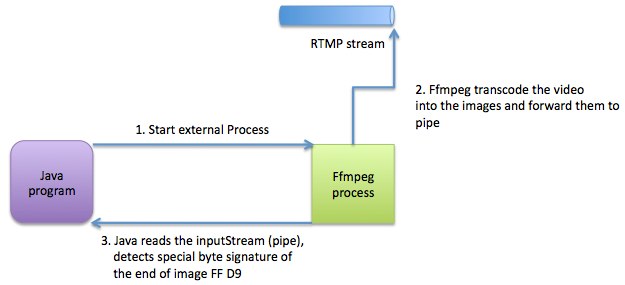
The schema describing the interactions between all components:
Actually, the RTMP stream can be replaced with a whatever source which can be read by ffmpeg.
samedi 22 février 2014
Best java client for swift (OpenStack storage) - JOSS
Recently, I had a task to choose a java client for interacting with OpenStack Storage service aka Swift.
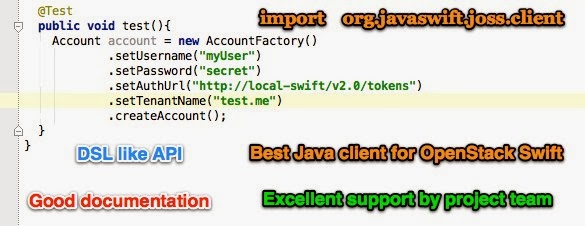
I recommend you JOSS
Actually, I found 3 open source projects on GitHub:
- https://github.com/dkocher/java-openstack-swift
- https://github.com/woorea/openstack-java-sdk
- https://github.com/javaswift/joss
After testing and working for a bit with each library I ended up with the following conclusion - the best one is JOSS - http://joss.javaswift.org
So, now the list of advantages:
- openstack-java-sdk is a huge library for almost all OpenStack services. I needed only swift driver so I wasn't interested to add useless dependencies. Always use KISS principle.
- java-openstack-swift from dkocher - I didn't manage to make a connection to my swift proxy. Maybe this library is very good and written by smart people, but the documentation is poor. If a developer should dig into the code source to figure out how to make the basic simple step, this will increase the learning curve. One more little disadventage is absence of the project in maven central repo.
- And finally the winner - JOSS - https://github.com/javaswift/joss by Robert Bor.
Why JOSS:
- Very simple API.
- The principle of modern fluid API building is used. The API is readable and comprehensible.
- Good documentation for each common task (authentication, uploading, downloading, etc)
- Available at standard maven repo.
- Excellent support organised by the project author - Robert Bor. He helped me within few hours to find an error in my configuration and pleased me with his reaction and quality of responses.
vendredi 25 janvier 2013
BuildNumber Component for Yii framework
Today I have committed the build number component for Yii framework.
This component is very simple but yet powerful and useful for industrial and enterprise-wide applications.

The project is hosted on GitHub - https://github.com/yev/yiiGitBuildNumber
This component is very simple but yet powerful and useful for industrial and enterprise-wide applications.
The project is hosted on GitHub - https://github.com/yev/yiiGitBuildNumber
lundi 14 janvier 2013
Java 7 list of new features
I've just put the link here to find it quickly:
http://docs.oracle.com/javase/7/docs/webnotes/adoptionGuide/index.html
This is an adoption guide for java 7 with the list of all new features (from official Oracle site).
http://docs.oracle.com/javase/7/docs/webnotes/adoptionGuide/index.html
This is an adoption guide for java 7 with the list of all new features (from official Oracle site).
vendredi 11 janvier 2013
Crypt password with salt in Yii framework
Hello,
Today I will share my experience while learning PHP and Yii framework by using the standard PHP function crypt.
First of all, here you can find some basic theory about why do you need use salt to encrypt the passwords.
Let's discuss the parts of your Yii app you should modify in order to benefit the more robust security for password encryption:
First of all, here you can find some basic theory about why do you need use salt to encrypt the passwords.
Let's discuss the parts of your Yii app you should modify in order to benefit the more robust security for password encryption:
- You should create (or generate with vii) User model with userName, userPass and userSalt fields.
- While saving the new user in your Database, you should encrypt the user password with randomly generated salt. I do this in User Model class, by overriding the method beforeSave. Like this:
protected function beforeSave()
    {
        if(parent::beforeSave())
        {
            if($this->isNewRecord)
            {
                $this->user_salt=   utf8_encode( mcrypt_create_iv(30) );
                $newPassword =  utf8_encode( crypt($this->user_pass, $this->user_salt) );
                $this->user_pass = $newPassword;
            }
            return true;
        }
        else
            return false;
    }
Code explanation:
- use standard PHP 5.4 mcrypt_create_iv function to generate the salt (this function available only since version 5.4);
- use standard crypt function with 2 parameters - first is the user password and the second one is the salt.
- I'm using the standard PHP utf8_encode function for properly view the password and salt in the Database. It's not mandatory. - The last step is modifying the existing authentificate method from protected/components/UserIdentity.php to check the credentials against the Database with salted password:
public function authenticate()
 {

        $record=User::model()->findByAttributes(array('user_name'=>$this->username));
        if($record===null)
            $this->errorCode=self::ERROR_USERNAME_INVALID;
        else if($record->user_pass !==  utf8_encode( crypt($this->password,$record->user_pass))){
            $this->errorCode=self::ERROR_PASSWORD_INVALID;
        }
        else
        {
            $this->username=$record->user_name;
            $this->errorCode=self::ERROR_NONE;
        }


        return !$this->errorCode;
 }
The code is obvious except the line 7 while we are using the function crypt where the second parameter is the encrypted user password(not salt)! Eh, yes, as the documentation of crypt function says, you should always use the encrypted data as a salt. If you will pass the $record->user_salt, you will get the wrong string that will not match your encrypted password. This trick caused me to spend few hours on debugging the issue.
samedi 27 octobre 2012
Liferay : how to fix NoSuchBeanDefinitionException while portlet deploying
I would like to share the fix for mysterious and annoying issue that I've encountered during the development and deploying of a portlet for Liferay 5.2.3.
The error that Liferay server (Tomact) listed in the logs was related to misconfigured Spring beans and the exception was org.springframework.beans.factory.NoSuchBeanDefinitionException: No bean named 'my.service.persistence.SynergieCategoryPersistence.impl' is defined
The partial stacktrace is belows:
The partial stacktrace is belows:
16:36:12,700 ERROR [PortalClassLoaderServletContextListener:92] org.springframework.beans.factory.BeanCreationException: Error creating bean with name 'my.service.SynergieCategoryLocalService.impl': Injection of BeanReference fields failed; nested exception is org.springframework.beans.factory.NoSuchBeanDefinitionException: No bean named 'my.service.persistence.SynergieCategoryPersistence.impl' is defined
org.springframework.beans.factory.BeanCreationException: Error creating bean with name 'fr.smile.synergie.service.SynergieCategoryLocalService.impl': Injection of BeanReference fields failed; nested exception is org.springframework.beans.factory.NoSuchBeanDefinitionException: No bean named 'my.service.persistence.SynergieCategoryPersistence.impl' is defined
 at com.liferay.portal.spring.annotation.BeanReferenceAnnotationBeanPostProcessor.postProcessAfterInstantiation(BeanReferenceAnnotationBeanPostProcessor.java:67)
 at org.springframework.beans.factory.support.AbstractAutowireCapableBeanFactory.populateBean(AbstractAutowireCapableBeanFactory.java:959)
 at org.springframework.beans.factory.support.AbstractAutowireCapableBeanFactory.doCreateBean(AbstractAutowireCapableBeanFactory.java:472)
 at org.springframework.beans.factory.support.AbstractAutowireCapableBeanFactory$1.run(AbstractAutowireCapableBeanFactory.java:409)
 at java.security.AccessController.doPrivileged(Native Method)
 at org.springframework.beans.factory.support.AbstractAutowireCapableBeanFactory.createBean(AbstractAutowireCapableBeanFactory.java:380)
 at org.springframework.beans.factory.support.AbstractBeanFactory$1.getObject(AbstractBeanFactory.java:264)
 at org.springframework.beans.factory.support.DefaultSingletonBeanRegistry.getSingleton(DefaultSingletonBeanRegistry.java:222)
 at org.springframework.beans.factory.support.AbstractBeanFactory.doGetBean(AbstractBeanFactory.java:261)
 at org.springframework.beans.factory.support.AbstractBeanFactory.getBean(AbstractBeanFactory.java:185)
 at org.springframework.beans.factory.support.AbstractBeanFactory.getBean(AbstractBeanFactory.java:164)
 at org.springframework.beans.factory.support.DefaultListableBeanFactory.preInstantiateSingletons(DefaultListableBeanFactory.java:429)
 at org.springframework.context.support.AbstractApplicationContext.finishBeanFactoryInitialization(AbstractApplicationContext.java:728)
 at org.springframework.context.support.AbstractApplicationContext.refresh(AbstractApplicationContext.java:380)
 at org.springframework.web.context.ContextLoader.createWebApplicationContext(ContextLoader.java:255)
 at org.springframework.web.context.ContextLoader.initWebApplicationContext(ContextLoader.java:199)
 at org.springframework.web.context.ContextLoaderListener.contextInitialized(ContextLoaderListener.java:45)
 at com.liferay.portal.spring.context.PortletContextLoaderListener.contextInitialized(PortletContextLoaderListener.java:77)
 at com.liferay.portal.kernel.servlet.PortalClassLoaderServletContextListener.portalInit(PortalClassLoaderServletContextListener.java:89)
 at com.liferay.portal.kernel.util.PortalInitableUtil.init(PortalInitableUtil.java:47)
 at com.liferay.portal.kernel.servlet.PortalClassLoaderServletContextListener.contextInitialized(PortalClassLoaderServletContextListener.java:73)
 at org.apache.catalina.core.StandardContext.listenerStart(StandardContext.java:3843)
 at org.apache.catalina.core.StandardContext.start(StandardContext.java:4342)
 at org.apache.catalina.core.ContainerBase.addChildInternal(ContainerBase.java:791)
 at org.apache.catalina.core.ContainerBase.addChild(ContainerBase.java:771)
 at org.apache.catalina.core.StandardHost.addChild(StandardHost.java:525)
 at org.apache.catalina.startup.HostConfig.deployDirectory(HostConfig.java:926)
 at org.apache.catalina.startup.HostConfig.deployDirectories(HostConfig.java:889)
 at org.apache.catalina.startup.HostConfig.deployApps(HostConfig.java:492)
 at org.apache.catalina.startup.HostConfig.check(HostConfig.java:1217)
 at org.apache.catalina.startup.HostConfig.lifecycleEvent(HostConfig.java:293)
 at org.apache.catalina.util.LifecycleSupport.fireLifecycleEvent(LifecycleSupport.java:117)
 at org.apache.catalina.core.ContainerBase.backgroundProcess(ContainerBase.java:1337)
 at org.apache.catalina.core.ContainerBase$ContainerBackgroundProcessor.processChildren(ContainerBase.java:1601)
 at org.apache.catalina.core.ContainerBase$ContainerBackgroundProcessor.processChildren(ContainerBase.java:1610)
 at org.apache.catalina.core.ContainerBase$ContainerBackgroundProcessor.run(ContainerBase.java:1590)
 at java.lang.Thread.run(Thread.java:680)
Caused by: org.springframework.beans.factory.NoSuchBeanDefinitionException: No bean named 'my.service.persistence.SynergieCategoryPersistence.impl' is defined
 at org.springframework.beans.factory.support.DefaultListableBeanFactory.getBeanDefinition(DefaultListableBeanFactory.java:387)
 at org.springframework.beans.factory.support.AbstractBeanFactory.getMergedLocalBeanDefinition(AbstractBeanFactory.java:971)
 at org.springframework.beans.factory.support.AbstractBeanFactory.doGetBean(AbstractBeanFactory.java:246)
 at org.springframework.beans.factory.support.AbstractBeanFactory.getBean(AbstractBeanFactory.java:185)
 at org.springframework.beans.factory.support.AbstractBeanFactory.getBean(AbstractBeanFactory.java:164)
 at org.springframework.context.support.AbstractApplicationContext.getBean(AbstractApplicationContext.java:880)
 at com.liferay.portal.bean.BeanLocatorImpl.locate(BeanLocatorImpl.java:59)
 at com.liferay.portal.kernel.bean.PortalBeanLocatorUtil.locate(PortalBeanLocatorUtil.java:58)
 at com.liferay.portal.spring.annotation.BeanReferenceElement.getResourceToInject(BeanReferenceElement.java:70)
 at org.springframework.beans.factory.annotation.InjectionMetadata$InjectedElement.inject(InjectionMetadata.java:180)
 at org.springframework.beans.factory.annotation.InjectionMetadata.injectFields(InjectionMetadata.java:105)
 at com.liferay.portal.spring.annotation.BeanReferenceAnnotationBeanPostProcessor.postProcessAfterInstantiation(BeanReferenceAnnotationBeanPostProcessor.java:64)
 ... 36 more
The portlet classes have been generated by build-service and the same code worked fine during last 2 years. So I was pretty sure that my Spring config is OK and the problem resides in the other part of the system.
After few days spent in debug mode, I have found that while deploying the portlet, the folder WEB-INF/lib was missing the jar file util-java.jar.
Obviously, util-java.jar is needed by Liferay to make some stuff. And apparently, in my case, this jar have not been copied automatically by Liferay hot deployer.
I have copied the missing util-java.jar to WEB-INF/lib and portlet has been deployed without any error.
mardi 8 mai 2012
Software Industrialization presentation
Few days ago I had to make a presentation about the software industrialization approaches at Octetis (the international IT company for whom I'm currently working).
The result is here - one page PDF document:

The one thing to share is about very beautiful and complete Project Gallery from MS Word for Mac.
All styles, fonts, document structure, etc. were available out of the box. All the other stuff was created using PowerPoint for Mac as well.
Merci Microsoft & Apple.
The result is here - one page PDF document:
The one thing to share is about very beautiful and complete Project Gallery from MS Word for Mac.
All styles, fonts, document structure, etc. were available out of the box. All the other stuff was created using PowerPoint for Mac as well.
Merci Microsoft & Apple.
jeudi 9 février 2012
Maven BuildNumber plugin - short revision id for Git
Today, I would like to explain the improvement for maven plugin - buildNumber, that I talked in my previous message - short revision id for Git SCM.
IMPORTANT : This feature is present in the maven-buildnumber-plugin 1.1 version.
<shortRevisionLength>
in the
<configuration>
section. For exemple:


Some implementation details
UPDATED: If your maven build can't find the dependency for maven-buildnumber-plugin 1.1 , try to force the dependency update by adding option "-U" for your mvn command.
mercredi 8 février 2012
My first Open Source commitment - Git short revision
Today, my patches for 2 maven projects have been accepted by the maven-buildNumber-plugin's project lead Olivier Lamy.

One of the web Java project, I currently working on, is fully automated with Maven. One interesting and useful thing is to have the date & the revision number at the bottom of the web page. Like this:
 It was done with excellent maven plugin buildNumber - http://mojo.codehaus.org/buildnumber-maven-plugin
The problem was that the project SCM migrated from the SVN to Git. And the revision ID in Git is too long. In fact it's SHA-1 sequence that should be unique across the world and all possible revisions... So the build id at the bottom of the page was so ugly for business users that I receive the task to make it shorter.
 After asking the question about the git short revision id in StackOverflow.com and in the user's mailing lists of the maven, I understood that the buildNumber plugin does not support this feature. And the project Lead, Olivier Lamy, gracefully proposed to me to make a patch and pointed out the first java class I have to look at.
After asking the question about the git short revision id in StackOverflow.com and in the user's mailing lists of the maven, I understood that the buildNumber plugin does not support this feature. And the project Lead, Olivier Lamy, gracefully proposed to me to make a patch and pointed out the first java class I have to look at. The code he sent me was very clear and I quickly figured out how to add the new feature that I called shortRevisionLength.
 After one day of working I have sent the patch to Olivier and created 2 issues on the codehouse JIRA server:
After one day of working I have sent the patch to Olivier and created 2 issues on the codehouse JIRA server:- http://jira.codehaus.org/browse/MBUILDNUM-86
- http://jira.codehaus.org/browse/SCM-664
I added some test cases and the documentation patch as well.
The next day the patch has been approved and integrated in the SVN. So, the next version of buildNumber plugin 1.1 contains some peace of code from Ukraine :) Nice.
jeudi 12 janvier 2012
Install Pear on Windows 7
Just a little tips about installing PEAR for PHP on Windows 7.
I have spent 3 hours today to install PEAR on Windows. I had systematically the error, when I was trying to execute config-set auto_discover 1 in the CMD:
PEAR_Config::writeConfigFile fopen('C:/Windows/pear.ini', 'w') failed... permission deniedIt was clear that the problem in the PEAR installation - the location of pear.ini file was wrong. It's important to note, that all installation and manipulation with pear I made with basic CMD.
If you have the same problems, you have to reinstall your PEAR with PowerShell.
With PowerShell the pear.ini is in the PHP folder and it will fixe all the problems
lundi 26 décembre 2011
Free MySQL backup with Dropbox
Recently, I've been working on creating an automatic service for backing up our RedmineMySQL database on the Debian server.

So I've decide to share there how I made a free backup service for the MySQL database.
I set several goals that should be attempted in order to consider that backup service is useful
- Only free & open source applications.
- Remote disk storage also for free.
- Backup must be automatic.
- Backup encryption.
- AutoMysqlBackup - http://sourceforge.net/projects/automysqlbackup - the core of theservice.
- DropBox free account (2 Gb for free) - www.dropbox.com
- crontab - a standard Linux job automation tool
- openssl - for encryptionHow does this it works together.A little description.
https://www.dropbox.com/install?os=lnx - install DropBox as a daemon
Downlaod & install AutoMysqlBackup tool. After the installation you have to modify the script /etc/automysqlbackup/automysqlbackup.conf
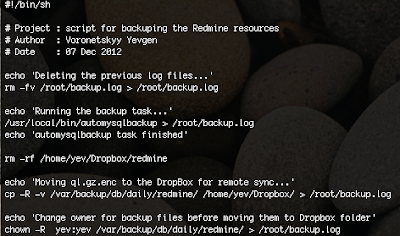 Download my example : http://dl.dropbox.com/u/3839545/backup.sh
You should uncomment the line you need and put the appropriate values. Each line in this script is well documented and you will find all the options you need. Just a brief description of what can you configure with it : mysql server address, mysql credentials for the command mysqldump, location where the dump will be stored, the regularity of the backuping, etc.
Next step, is creating your own bash script that will be called by cron, make a backup with autoMysqlBackup, copy the backup files into the local dropBox folder.
 Download my example : http://dl.dropbox.com/u/3839545/backup.sh
Make sure that your own backup.sh is runnable (don't forget chmod u+x backup.sh)
The next step is to configure your crontab. In the crontab I've defined the period of time the script backup.sh will be called. I set up the backup everyday at 3:00 AM.
Make sure you have the root privileges and run the following command :
crontab -e
and at the end of the file add the line :
00 03 * * * /root/backup.sh
And the last step is about the encryption. The openSSL encryption is made by the AutoMysqlBackup, for this you have to uncomment in your /etc/automysqlbackup/automysqlbackup.conf the following line:
CONFIG_encrypt='yes'
don't forget to set the password to encrypt!
That's all, make a test that prove that your backup is working fine before moving all this stuff in the production environment.
mercredi 25 mai 2011
Git killer features
After 3 weeks of working with Git (the DCVS written by Linus Torwalds), I definitely can say that it is a great technology. 
What are the killer features of Git for me:
Git - pdf book about git
I can recommend to download a free PDF book "Git Community Book" about git from http://book.git-scm.com
As long as I learning Git, as more I understand its powerfull.
If you are asking yourself what you need to learn right now? What is the next major revolution in the IT world? Maybe, the answer will be Git.

What are the killer features of Git for me:
- Distributed – I can develop normally even without Internet and access to the central repository. It’s a great feature to make small and concise commits while developing at home, during the weekend.
- Rich history revision mechanism – the search within the log-history is wonderful. With
git log –sSecurityManager
I can find, for example, all commits that introduce or remove the SecurityManager class. Attention, the search is performed on the source code and not on the commit log. It’s a best tool for making the code live analysis. - Git bisect – automatically find a failing commit using the binary search and a set of unit tests. If you don’t use the CI server (shame on you :)), you can nevertheless quickly find a bad commit. Git bisect command will run the tests against the project snapshots. Each snapshot is associated with a particular commit. I did not try to use this command yet. But, the concept is great.
- CMD – git is a command line based tool. You can script the commands, make aliasing etc. CMD speed up your productivity. Of course, for making the merge it’s not so trivial, but the guys from Eclipse will soon release a completely functional version of the plugin eGit.
- git cherry-pick - reintegate an existing commit to the current branch. How many times you have forgot to switch to the correct branch before making a commit? I have been confronted with this painfull mistake quite often. Now you don't have to report your commit manually to the correct branch. The magic cherry-pick command will make it four you!
I have worked with git on Windows and Mac. Git for Mac is a stable and I have not noticed any problem. It is not the case for Windows...
Git remote tags problems
For running Git on Windows box, you have to install msysgit (I used 1.7.4.msysgit.0). The one problem I encountered with msysgit, it was that I could not push my tag to the remote repo. The commandgit push --tags origin masterdid not create a tag remotely. The same command executed on Mac did the job correctly.
Git - pdf book about git
I can recommend to download a free PDF book "Git Community Book" about git from http://book.git-scm.com
As long as I learning Git, as more I understand its powerfull.
mardi 3 mai 2011
Tools : free screenshot capture
The tool of the day is gadwin printScreen (only for Windows users).
A really powerful and free screenshot capture tool that I used on my Windows box.
You can download it here
A really powerful and free screenshot capture tool that I used on my Windows box.
You can download it here
Log4j : Customize LoggingEvent for SMTPAppender
Hi,
The error message should be enclosed by the corporation information represented by the header and footer. The problem is the application URL (marked by the red ellipse). This URL can be different depending on the environment where the application is running and throwing the exception. In the complex, industrial projects where exist many environments, this can be very helpful to determine which environment has a problem.

And what about the environment dependent URL ? How can I put the http://myapp.production.com or http://myapp.integration-test.com in the log message? I found 2 solutions:

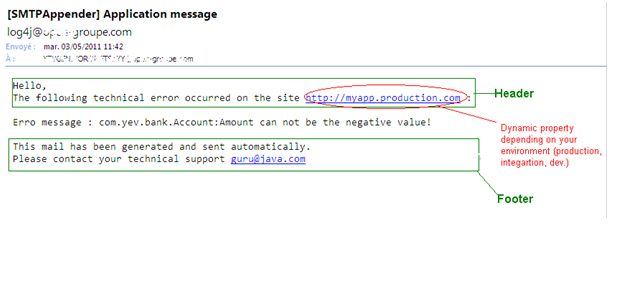
Recently I was confronted to the need of customizing the log4j message generation. When an exception occurs, the application should sent the email to the development team in the following format:
The error message should be enclosed by the corporation information represented by the header and footer. The problem is the application URL (marked by the red ellipse). This URL can be different depending on the environment where the application is running and throwing the exception. In the complex, industrial projects where exist many environments, this can be very helpful to determine which environment has a problem.
First of all, how set the footer and header? It’s quite simple, you have to use org.apache.log4j.EnhancedPatternLayout, in the parameter ConversionPattern, you put the header, footer and the message error with some additional information (date, class name which generated the exception, etc). The standard log4j distribution(log4j.jar file) does not contain the class EnhancedPatternLayout, you have to download the additional extras companion (here)
Pay particular attention to do not use org.apache.log4j.PatternLayout which contains some issues with synchronization (see the first paragraphe of the associated JavaDoc). PatternLayout class is still widely used and all exemples on Internet use it, but for make your code robust you don’t have to use it.
And what about the environment dependent URL ? How can I put the http://myapp.production.com or http://myapp.integration-test.com in the log message? I found 2 solutions:
- Use ant or maven to replace a specific symbol in your log4j.xml (log4j.properties) when you are building the app. You can use filter resource maven plugin fot that. But is not the most elegant solution, because you will have a strong dependency with the build tool. For production system, it is not a choice.
- Use org.apache.log4j.EnhancedPatternLayout and %properties{key} mechanism
The code is self documented. I put the URL to prod environment behind the key named "app".I hardcoded the value in order to make the explanation simpler. But in your production code you may get the correposnding value from properties file, from environment variable or from the database.
Next, the key “app” in the event property becomes available for Log4J runtime. You may see how I use it in my log4j.xml file (the 2nd screenshot).
The setProperty method is an extension point and the excellent example of a good designed API.
Updated : actually, there is a simpler method to inject the environment name into the log4j logging message - simply, change the ConversionPattern for each log4.propeperties file.
Inscription à :
Articles (Atom)


 Articles

