Recently, I've been working on creating an automatic service for backing up our RedmineMySQL database on the Debian server.

So I've decide to share there how I made a free backup service for the MySQL database.
I set several goals that should be attempted in order to consider that backup service is useful
- Only free & open source applications.
- Remote disk storage also for free.
- Backup must be automatic.
- Backup encryption.
- AutoMysqlBackup - http://sourceforge.net/projects/automysqlbackup - the core of theservice.
- DropBox free account (2 Gb for free) - www.dropbox.com
- crontab - a standard Linux job automation tool
- openssl - for encryptionHow does this it works together.A little description.
https://www.dropbox.com/install?os=lnx - install DropBox as a daemon
Downlaod & install AutoMysqlBackup tool. After the installation you have to modify the script /etc/automysqlbackup/automysqlbackup.conf
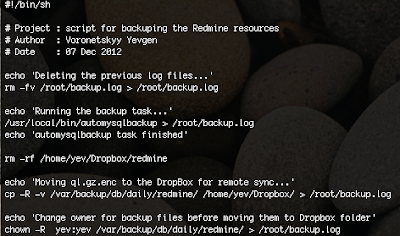 Download my example : http://dl.dropbox.com/u/3839545/backup.sh
You should uncomment the line you need and put the appropriate values. Each line in this script is well documented and you will find all the options you need. Just a brief description of what can you configure with it : mysql server address, mysql credentials for the command mysqldump, location where the dump will be stored, the regularity of the backuping, etc.
Next step, is creating your own bash script that will be called by cron, make a backup with autoMysqlBackup, copy the backup files into the local dropBox folder.
 Download my example : http://dl.dropbox.com/u/3839545/backup.sh
Make sure that your own backup.sh is runnable (don't forget chmod u+x backup.sh)
The next step is to configure your crontab. In the crontab I've defined the period of time the script backup.sh will be called. I set up the backup everyday at 3:00 AM.
Make sure you have the root privileges and run the following command :
crontab -e
and at the end of the file add the line :
00 03 * * * /root/backup.sh
And the last step is about the encryption. The openSSL encryption is made by the AutoMysqlBackup, for this you have to uncomment in your /etc/automysqlbackup/automysqlbackup.conf the following line:
CONFIG_encrypt='yes'
don't forget to set the password to encrypt!
That's all, make a test that prove that your backup is working fine before moving all this stuff in the production environment.


 Articles

