Affichage des articles dont le libellé est tools. Afficher tous les articles

mardi 8 mai 2012

Software Industrialization presentation

Few days ago I had to make a presentation about the software industrialization approaches at Octetis (the international IT company for whom I'm currently working).

The result is here - one page PDF document:


The one thing to share is about very beautiful and complete Project Gallery from MS Word for Mac.

All styles, fonts, document structure, etc. were available out of the box. All the other stuff was created using PowerPoint for Mac as well.

Merci Microsoft & Apple.

lundi 26 décembre 2011

Free MySQL backup with Dropbox

Recently, I've been working on creating an automatic service for backing up our RedmineMySQL database on the Debian server.
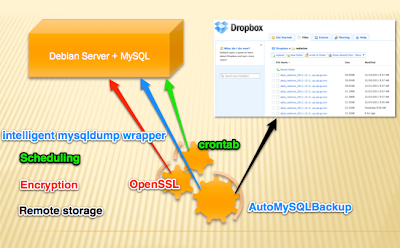

So I've decide to share there how I made a free backup service for the MySQL database.
I set several goals that should be attempted in order to consider that backup service is useful

  1. Only free & open source applications.
  2. Remote disk storage also for free.
  3. Backup must be automatic.
  4. Backup encryption.
To accomplish these requirements finally I have selected the next tools:
  1. AutoMysqlBackup - http://sourceforge.net/projects/automysqlbackup - the core of theservice.
  2. DropBox free account (2 Gb for free) - www.dropbox.com
  3. crontab - a standard Linux job automation tool
  4. openssl - for encryptionHow does this it works together.A little description.
First of all you will be need a DropBox account - there your MySQL backups will arrive and willbe stored. You have to download the DropBox client application or a DropBox daemon. I suggest you to use a dropboxd (daemon) for the server use:

https://www.dropbox.com/install?os=lnx - install DropBox as a daemon

Downlaod & install AutoMysqlBackup tool. After the installation you have to modify the script /etc/automysqlbackup/automysqlbackup.conf

You should uncomment the line you need and put the appropriate values. Each line in this script is well documented and you will find all the options you need. Just a brief description of what can you configure with it : mysql server address, mysql credentials for the command mysqldump, location where the dump will be stored, the regularity of the backuping, etc.

Next step, is creating your own bash script that will be called by cron, make a backup with autoMysqlBackup, copy the backup files into the local dropBox folder.
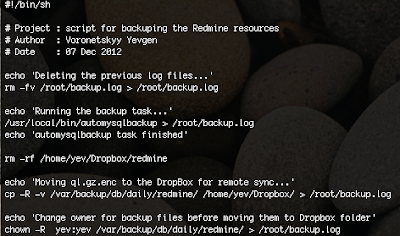
Download my example : http://dl.dropbox.com/u/3839545/backup.sh

Make sure that your own backup.sh is runnable (don't forget chmod u+x backup.sh)

The next step is to configure your crontab. In the crontab I've defined the period of time the script backup.sh will be called. I set up the backup everyday at 3:00 AM.
Make sure you have the root privileges and run the following command :
crontab -e
and at the end of the file add the line :
00 03 * * * /root/backup.sh

And the last step is about the encryption. The openSSL encryption is made by the AutoMysqlBackup, for this you have to uncomment in your /etc/automysqlbackup/automysqlbackup.conf the following line:
CONFIG_encrypt='yes'
don't forget to set the password to encrypt!

That's all, make a test that prove that your backup is working fine before moving all this stuff in the production environment.

mercredi 25 mai 2011

Git killer features

After 3 weeks of working with Git (the DCVS written by Linus Torwalds), I definitely can say that it is a great technology.

If you are asking yourself what you need to learn right now? What is the next major revolution in the IT world? Maybe, the answer will be Git.


What are the killer features of Git for me:
  • Distributed – I can develop normally even without Internet and access to the central repository. It’s a great feature to make small and concise commits while developing at home, during the weekend.
  • Rich history revision mechanism – the search within the log-history is wonderful. With
    git log –sSecurityManager
    I can find, for example, all commits that introduce or remove the SecurityManager class. Attention, the search is performed on the source code and not on the commit log. It’s a best tool for making the code live analysis.
  • Git bisect – automatically find a failing commit using the binary search and a set of unit tests. If you don’t use the CI server (shame on you :)), you can nevertheless quickly find a bad commit. Git bisect command will run the tests against the project snapshots. Each snapshot is associated with a particular commit. I did not try to use this command yet. But, the concept is great.
  • CMD – git is a command line based tool. You can script the commands, make aliasing etc. CMD speed up your productivity. Of course, for making the merge it’s not so trivial, but the guys from Eclipse will soon release a completely functional version of the plugin eGit.
  • git cherry-pick - reintegate an existing commit to the current branch. How many times you have forgot to switch to the correct branch before making a commit? I have been confronted with this painfull mistake quite often. Now you don't have to report your commit manually to the correct branch. The magic cherry-pick command will make it four you!

I have worked with git on Windows and Mac. Git for Mac is a stable and I have not noticed any problem. It is not the case for Windows...

Git remote tags problems

For running Git on Windows box, you have to install msysgit (I used 1.7.4.msysgit.0). The one problem I encountered with msysgit, it was that I could not push my tag to the remote repo. The command
git push --tags origin master
did not create a tag remotely. The same command executed on Mac did the job correctly
.

Git - pdf book about git

I can recommend to download a free PDF book "Git Community Book" about git from http://book.git-scm.com

As long as I learning Git, as more I understand its powerfull.

mardi 3 mai 2011

Tools : free screenshot capture

The tool of the day is gadwin printScreen (only for Windows users).

A really powerful and free screenshot capture tool that I used on my Windows box.

You can download it here